Monday, September 20, 2010
Hotbar Adware
Tuesday, August 3, 2010
Antivir Pro
The Antivir Solution Pro virus is, in its great part, a “standard” rogue (fake) anti-spyware (just like the Security Master AV virus we talked about in one of our previous removal guides) that has only one goal: making you believe that your computer is infected so that you pay for the full program. As Antivir Solution Pro virus is a scam, the only thing you should do is remove the Antivir Solution Pro virus using the removal guide below.
But before we reach the main part of this article, you should be aware that Antivir Solution Pro got on your computer when you visited an infected website and came across some malware or some exploit kits that installed Antivir Solution Pro on your computer. Obviously enough, if you don’t make sure that you computer is protected when surfing the web, there is a big chance that Antivir Solution Pro or a similar rogue will install itself on your computer again in the future.
How to uninstall / remove Antivir Solution Pro (Virus Removal Guide)
What does the Antivir Solution Pro virus do ?
Basically, Antivir Solution Pro is a fake anti-spyware program that will always state that your computer is infected so that you buy the software (don’t buy Antivir Solution Pro as it is a scam). In addition, it will block some applications from running and mess up your Internet Explorer settings so that you might not be able to get your computer online.
How to protect your computer against Antivir Solution Pro and other similar viruses / rogues:
Well, first of all, it would be great if you had an updated antivirus suite installed on your computer(suck as Kaspersky Internet Security, Nod 32, or the free Avast Antivirus or MSE).
It is also very important that your Windows operating system has all the security patches installed and that Adobe Flash, Adobe Reader and similar software are also up to the current, updated version. For a more detailed list of the software installed on your computer that needs an update, you can run theSecunia Online Software Inspector.
Try using a more secure web browser such as Mozilla Firefox or Google Chrome.
How to remove the Antivir Solution Pro virus
Ok, so I had to edit the steps a little, because Antivir Solution Pro seems to be very active and we’ll have to close the process before anything else can be done. You will need to download iExplore.exeon another computer (iExplore is a great tool developed by Lawrence Abrams from bleepingcomputer.com. It will stop the Antivir Solution Pro process, so that we’ll be able to remove it.) and then transfer it on the desktop of the infected computer (use an USB stick or a CD/DVD).
1. Ok, now that we are set to go, we should stop the Antivir Solution Pro process so that we can remove it. To do this, run iExplore until Antivir Solution Pro is gone. Try to run it multiple times simultaneously if you feel like you’re getting nowhere. But don’t worry, iExplore will get the job done eventually.
2. If you only have Internet Explorer installed, you will have to undo the changes this virus did in yourInternet Explorer settings so that you can surf the Internet once again. To do this:
- Open Internet Explorer and go to Tools->Internet Options.
- Now click the “Connections” tab, then the LAN Settings button in the bottom half of the window.
- Now uncheck the “Use a proxy server for your LAN” option.
3. Now that you are able to connect to the Internet, you should download a few files and apps that will help us down the road. Just download the files linked to below on your desktop
Malwarebytes Anti-Malware – We will use MBAM for actually removing this virus from your computer.
SuperAntiSpyware – This will be our secondary option if MBAM does not do the job
4. Many people don’t give this as much importance, but I feel like it’s a needed step. Just to make sure, you should delete all temporary files from your computer (click for a tutorial on that).
5. Now that Antivir Solution Pro is no longer running, we should be able to remove it using MBAM. Just follow these steps:
- Run the MBAM setup from your desktop.
- Proceed with the standard install settings
- Make sure the software update itself once it has been installed
- When MABM is up and running, go to the Scanner tab and perform a full scan
- Wait for MBAM to scan your computer for Antivir Solution Pro, as well as for any other malware your computer might be infected with
- When the scan is complete, remove all detected infections
6. Although you should have removed the Antivir Solution Pro virus from your computer, if this routine doesn’t do the trick, I guess you could try the same steps, only that instead of using MBAM, you use SuperAntiSpyware this time.
Antimalware Doctor Protection Center
What is Antimalware Doctor Protection Center?
Antimalware Doctor Protection Center is nothing but a total scam that will propagate on to computers that are vulnerable to Trojan attack. It can be dropped and installed on computer unknown to users who still uses outdated web browser. Just like its predecessor, Antimalware Doctor, it will alter system registry to make itself run each time Windows is started. A Windows Security Center-like icon will be placed on the task bar that monitors system activities. It represents as a real-time anti-virus, firewall and automatic updates.
While still on the computer, Antimalware Doctor Protection Center will continuously display fake warning messages attempting to convince its victims into purchasing the registered version of it. Off course this is not free, after all it was created as a money-making program for its developers. Immediately remove Antimalware Doctor Protection Center and all of its files and system process with a powerful anti-malware program.
| Type | Rogue |
| Sub-Type | FakeAV |
| Aliases | |
| OS Affected | Windows |
| Detected By | MalwareBytes |
What are the Symptoms of Antimalware Doctor Protection Center Infection?
It will modify Windows Registry and add the following entries:
- HKEY_CURRENT_USER\Software\Antimalware Doctor Inc\Antimalware DoctorHKEY_CURRENT_USER\Software\Microsoft\Windows\CurrentVersion\Uninstall\Antimalware DoctorHKEY_CURRENT_USER\Software\Microsoft\Windows\CurrentVersion\Run “Antimalware Doctor.exe”
The threat will drop the following malicious files:
- %APPDATA%\mozilla\firefox\profiles\[PROFILE NAME]\gsl.dll
- C:\Windows\System32\enemies-names.txt
- C:\Windows\System32\Antimalware Doctor.exe
- C:\Documents and Settings\malwarehelp.org\My Documents\New Folder\setupapp6262205323364.exe
- C:\Documents and Settings\malwarehelp.org\My Documents\New Folder\enemies-names.txt
- C:\Documents and Settings\malwarehelp.org\My Documents\New Folder\hookdll.dll
How to Remove Antimalware Doctor Protection Center Manually
Automatic Removal of Antimalware Doctor Protection Center
7. MBAM will run and update itself after installation. Close MBAM after the update.
14. Antimalware Doctor Protection Center and all its files are now removed from your computer. To protect your computer from this threat and avoid future infections, you may want to obtain a Full Version of MalwareBytes’ AntiMalware.
Thursday, July 1, 2010
AVG Anti-Spyware
Overview:
AVG Anti-Spyware 7.5.1.43 is a Spyware Abatement artefact from ewido.net; the able band-aid adjoin the new bearing of threats overextension over the internet. Defended your abstracts and assure your aloofness adjoin sypware, adware, trojans, dialer, keylogger and worms. We action you avant-garde scanning and apprehension methods and avant-garde technology abaft an easy-to-use interface. SoftSea.com had absolutely tested, advised and uploaded the install files, AVG Anti-Spyware does not accommodate any adware or spyware, the latest adaptation is 7.5.1.43-3339, you can download this spyware abatement software (13.21 MB) from appropriate server of SoftSea.com. The authorization of this antivirus & aegis software is Chargeless Balloon Software, you can chargeless download and get a chargeless balloon afore you buy. If you demand to get a abounding or no bound adaptation of AVG Anti-Spyware, you can buy this antivirus & aegis software
• Easy to use aegis – install and forget
• Abounding on-access aegis — the able AVG Resident Absorber provides best aegis by scanning every book opened, executed, or saved. It additionally prevents the aperture or active of malware. Self-protection at the atom band guarantees gapless ecology by preventing malware from disabling your anti-spyware protection.
• New affairs versions and updates, for free, throughout the authorization duration
• Self-protection at atom band guarantees gapless monitoring
• Automated blackmail administration — AVG can automatically apple-pie adulterated files and abolish added threats such as trojans, dialers, hijackers, spyware, and keyloggers. Suspicious files can be cautiously confused into quarantine.
• Strong signatures for college attrition to malware (malicious software) variations.
• High-level scanning capabilities — AVG detects sleeping and non-dangerous malware (i.e., malware that has been downloaded but not yet activated). It uses able signatures to defeat attempts to abstain apprehension via malware variation, and can deeply ascertain and annul DLL-trojans. With all-encompassing crypter and adhesive technology as able-bodied as heuristic analysis, AVG offers your computer the best absolute apprehension of malware.
• Unique automated threat-removal anti-spyware engine
• User affable and able operation — In accession to an automatic user interface, AVG offers calmly configured able afterlight and simple scheduling of tasks. Configuring affairs exceptions is aboveboard and allows you to exclude defined programs from AVG’s absolute scanning.
• Complete set of assay accoutrement — AVG Anti-Spyware allows you to assay and ascendancy your computer with a advanced arrangement of assay accoutrement such as admirers for processes, connections, browser plugins, startup entries etc. It additionally appearance a shredder for defended book abatement and a apparatus to amalgamate your Windows installation
• 24/7 abstruse abutment provided at no added cost
• Resident absorber with on-access scanning
Operating Arrangement Requirements:
• Minimum arrangement requirements are * CPU Intel Pentium, 300 MHz, 70 MB chargeless adamantine drive amplitude and 64 MB RAM
Download: http://www.filehippo.com/download_avg_antispyware/
Thursday, June 24, 2010
Hard Disk Cleaner
According to the account:
Central and Eastern Europe represented the regions with the paramount
piracy rate (67%), followed by Latin America (65%). Georgia had the paramount
piracy rate at almost 95% followed by Armenia, Bangladesh and Zimbabwe.
The United States has the lowest PC software piracy rate in the macrocosm, 20%, but because it is the macrocosm\'s largest software peddle, it has the largest dollar losses from piracy, $9.1 billion. Japan, New Zealand and Luxembourg also own low software piracy rates, impending 20%.
But with app stores and especially the one needed to run apps on iPhones, iPads and iPod Touch devices, developers own no preference but to ensure they are paid the perfect payment they press if they crave to own their products distributed by Apple. Moreover, Apple gets 30% of the revenue associated with all the software sold in the pantry meaning this US troop sees a tolerably great rate of software sales regardless of where developers or users are located. As Apple continues to carry the macrocosm by gale - and seeing how the troop received over 600,000 iPhone 4 pre-orders in one day, enough to crash their systems - there seems to be no shrinking long to use the troop\'s products. Things are so honest for Apple revitalize now; some are asking if the troop and AT&T can even hilt all the orders for the highly-anticipated new badge.
One threat to Cupertino comes from mistiness-based software from Google, Microsoft and others which is essentially emancipate and potentially ad-supported. Still, using apps can be a much renovate experience than using the web - depending on how well developers utilize the particular environment their programs exist in. And with the generally low-payment associated with many of the apps in the App Store, Apple and the developer community seem to own hit upon a formula where users are comfortable barrage out financial for their apps.
According to GigaOM referencing a examine about six months expired, the normal App Store user spends $4.47 on apps every month. I expect this total to intensify as the total of apps intensify in the pantry and it is worth noting there are midpoint coupled the total of apps in the pantry today as there were at the latter of last year! Assuming 100 million App Store users this translates into $53.64 per year per user or $5.3B in number. At this total, apple\'s carry would be $1.6B!
Another threat to Apple is jailbreaking - the law of bypassing the troop\'s administer over the OS and subsequently gap yourself up to a macrocosm of emancipate apps and multitasking. In my experience, the many young I notice who do jailbreak peace honorarium for apps and those who don\'t are generally students who couldn\'t afford to honorarium for apps anyway. People who are super-scientific seem to be the primary \"jailbreakers\" and Apple\'s products are so manageable to use; the threat of having to treaty with an OS which may crash or own problems has kept many who would jailbreak from fascinating the immerse. That and the truth that jailbreaking voids the Apple warranty.
Fake Firefox Adobe Flash Player
According to the doorjamb on Sophos’ website, this malware seems to be spreading via Internet forums. You probably won’t have to annoy about things like this if you download any plugins directly from Mozilla’s website (but you should calmness be leery).
On Sophos’ website, there are some screenshots that illustrate the difficulty you would have trying to determine whether or not you were installing a legit plugin versus one containing some genre of malware.
If you vision to inspection your installed version of Flash, you can visit the inspection
page setup on Adobe’s website and you can download the existing version of Flash from Adobe’s website as well.
Green AV Security Suite
Removing Green AV Security Suite (GreenAV) from infected computers is not the removal of Green AV Security Suite adware only. The adware is the love of the trickery while there are lateral infections that provide entire-featured workable of the adware and its upload and installation. Green AV Security Suite may as well be recreated by the agent in proceedings the dropper of Green AV Security Suite remains after you withdraw Green AV Security Suite. Click here to pest entire and precise Green AV Security Suite removal to recruit rid of Green AV Security Suite adware and any allies of the adware.
Green AV Security Suite Technical Details
Full recap
: Green AV Security Suite, GreenAV Security Suite, Green AV SecuritySuite
Version: 2010
Type: Malware
Origin: Russian Federation
Signs of being infected with Green AV Security Suite :
Showing alerts and shrew screens at increasing trudge is the method to occupation users and in such a aged hackers expect to amass Green AV Security Suite registration freedom. Therefore Green AV Security Suite is not a concealed threat and it is not a ordinary mannerism of Green AV Security Suite to pageant only untitled alerts at summit. That does not mean that such occurrence when there are only unnamed alerts by Green AV Security Suite in your monitor can never happen, but, should it happen, it is somewhat the exclusion that proves the ordinance. In such a occurrence Green AV Security Suite adware is calm observable as its alerts are linked to its website. Click here to pest free construe method and to withdraw Green AV Security Suite, as well as other unveiled immorality entries.
Automatic Removal of Green AV Security Suite from your PC:
Since there are too many Green AV Security Suite allies it sounds somewhat logical to happen the fit underneath in behest to withdraw Green AV Security Suite adware and to recruit rid of Green AV Security Suite associated threats, though there might be no other malady but Green AV Security Suite to withdraw.
Manual Removal of Green AV Security Suite:
Manual Removal of Green AV Security Suite
Green AV Security Suite removal in directions means is deemed to be in nocuous and adequate Green AV Security Suite removal in proceedings you undertake the second safety steps before Green AV Security Suite removal steps:
- Reboot your OS in Safe Mode (chose steal means in the Boot Menu)
- disable Internet kin
- do not use any software and ensure it leave not launch while you are removing Green AV Security Suite.
Anti-Virus Elite 2010
However, on the one hand, the detail is that unpunctual the incubation of malware hides a very vast errand in which every day must be added other \"associates\". Moreover, what happens when we format to buy this antivirus is licit the negative.
This is the circumstances of the Anti-Virus Live 2010 or what is the duplicate, Anti-Virus Elite 2010 malware scare ware genre (or scoundrel), which makes it moderately evident that the processes and mechanisms by which deceives leadership to rob your richness are well oiled and well abstraction out.

At pinnacle designate, as is normal in this genre of threat, the strategy is supported by a website that is used to \"worry\" to lure potential victims, saying all sorts of justifications to \"prove\" some credibility on the delusory antivirus, which complements a average disinformation campaign.
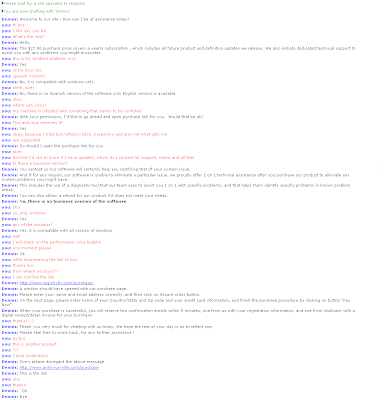
So far, nothingness interesting. Except for the option of requesting help via prattle. Interesting. Then check if this cheek
is legitimate ... Yes it\'s.
Consequently, message was established through this choice with the confound that immediately got sentiment from the other merit

We basically said Dennis, the merchant, which among other things the circumgyration antivirus is compatible with all versions of Windows, its value is USD 27, which only supports English and no enterprise version and no problems eliminating conficker.

Let us briefly discuss these points. Obviously, the scareware must be compatible with all versions of Windows as it\'s this occasion the audience that the threat is directed. Why? Simply because other than 80% of connections use Windows as the paramount operating equipment in home environments where the potential for finding a particular victim increases. This means is much other likely \"to confidential errand.\"
For the duplicate grassland there isn\'t version for GNU/Linux, even, not even version oriented businesses; because usually, the companies engage a higher quality of precaution where probably the scareware not find results.
Why English and not Russian? Because English is the third most catchy paragraph. Its price, USD 27, represents a competitive value that\'s commensurate with the ordinary price of legitimate antivirus programs. And regarding conficker, whether by koobface wondering, the clue would engage been the duplicate.
A very interesting detail that helps to accept its real magnitude of the illegitimate errand of malware, is the mistake committed by the \"affiliate\" Dennis when requesting the URL to buy a delusory distemper. It gives us the url registryfix.com/purchase and occasion of comment that is not in interrogate the supposed distemper, offering the proviso antivirus elite.com/purchase the duplicate url.However, we were trying to confidential \"errand\" by Anti-Virus Live 2010 and not Anti-Virus Elite 2010, forming it striking that this is the duplicate threat below different names. Even the duplicate \"mate\" manages and markets assorted alternatives below identical means. In this circumstances, also offering the fraudulent sale of Registry Fix, another associated with NoAdware and scareware ErrorClean.
From a scientific particle of landscape, the empire of this threat is in the IP salute 204.232.131.12, hosted by the ISP Rackspace, located in the city of Hoboken in the United States below AS27357.
According to the chronicle of this AS, the activities generated by resentful law are revered
From the website you download an executable named setup.exe (MD5:C50DC619E13345DEC2444B0DE371DFD4) which corresponds to scareware installer with a low percentage of detection.

Friday, June 18, 2010
AT&T-iPad security
The issue is that ICC-IDs—unique serial numbers that identify each SIM card—can often be converted in to IMSIs. While the ICC-ID is nonsecret—it’s often found printed on the boxes of cellphone/SIM bundles—the IMSI is secret. In theory, knowing an ICC-ID shouldn’t be to decide an IMSI. The phone companies do require to know which IMSI corresponds to which ICC-ID, but this ought to be completed by looking up the values in a giant database.
In practice, however, plenty of phone companies basically calculate the IMSI from the ICC-ID. This calculation is often simple indeed, being small more complex than “combine this hard-coded value with the last nine digits of the ICC-ID.” So while the leakage of AT&T’s customers’ ICC-IDs ought to be harmless, in practice, it could reveal a secret ID.
What can be completed with that secret ID? a lot, it turns out. The IMSI is sent by the phone to the network when first signing on to the network; it’s used by the network to figure out which call ought to be routed where. With anyone else’s IMSI, an attacker can decide the person’s name & phone number, & even track his or her position. It also opens the door to active attacks—creating fake cell towers that a victim’s phone will connect to, enabling every call & text message to be eavesdropped.
Fake Windows Registration Checker Information
Fake Windows Registration Checker Information:
Fake Windows Registration Checker is a cyber scam developed to swindle money from unwary computer users. Fake Windows Registration Checker appears to be a legitimate Microsoft product, but it is nothing more but a scam. Once running, Fake Windows Registration Checker pops up on your computer desktop and prompts the user to fill in a form that requires credit card information. Fake Windows Registration Checker intrudes the computer through software loopholes and will launch quickly after the system starts up. If Windows Registration Checker like the one in the screenshot appears on your computer, do not provide your credit card details and the best way to do is to follow the removal instructions below and remove Fake Windows Registration Checker immediately.
Fake Windows Registration Checker Screenshot:
Manual Removal
Note: If you are not proficient with computer, it’s suggested that you backup your registry before manually removing Fake Windows Registration Checker. And double check the entries that you are going to delete, or your computer can’t work for missing some files.
The registry entries you need to delete:
HKEY_CURRENT_USER\Software\Microsoft\Windows\CurrentVersion\Run “Windows Registration Checker”
Please, be aware that manual removal of Fake Windows Registration Checker is a cumbersome task and can not always ensure complete removal of the malware, due to the fact that some files might be hidden or may get reanimated automatically afterwards. Moreover, lack of the required skills and even the slightest deviation from the instructions may lead to irreparable system damage. That’s why it’s strongly recommended automatic removal of Fake Windows Registration Checker, which will save your time and enable avoiding any system malfunctions and guarantee the needed result.
Automatic Fake Windows Registration Checker Removal:
1. Restart your computer and keep pressing F8 Key before Windows launches. Use the arrow keys to select the “Safe Mode with Networking” option, and then hit ENTER Key to continue.
2. Download Spyware Cease (Spyware Cease review), install it and update its database to the latest. After that, restart your computer so as to make Spyware Cease fully functional. Repeat Step 1 into Safe Mode and run an Online Scan of your computer so that Spyware Cease can detect all potential malware in your system.
NOTE: If you have problem installing Spyware Cease, you can download this correction script, unzip it and then double click to run it. It will correct your registry settings that the virus has modified. Then double click the program and finish the installation.
3. After the Online Scan finishes, click “Details” for the malware detected to make sure that your important data are not infected and removed. Ignore or select the scan result and click “Remove” to remove the threats. Reboot your computer and let Spyware Cease delete all detected virus.
4. Download and install RegTweaker (RegTweaker review) to repair your corrupted registry.
Why should you need RegTweaker?
As we all know, virus and Trojans modify and destroy system registry and make the computer malfunction so that the computer will not perform normally. Even if the virus and Trojans are removed, the registry is still destroyed or modified, so the computer still has problems. That’s the very reason why you need to repair the registry. At the meanwhile, some virus and Trojans leave some DLL files in the registry and this will cause strange DLL errors and affect the computer performance.
To make your computer run as perfectly as before or much faster than before:
1. Download and install RegTweaker.
2. Run a full scan of your registry.
3. Click “Repair Problems” and repair all errors detected.
After these 3 easy steps, your computer will run much faster than before within minutes!
Article source by http://www.security-wire.com/06/how-to-remove-fake-windows-registration-checker.html